Block Colors
Customize the visual appearance of rundown block types with separate color schemes for light and dark themes.
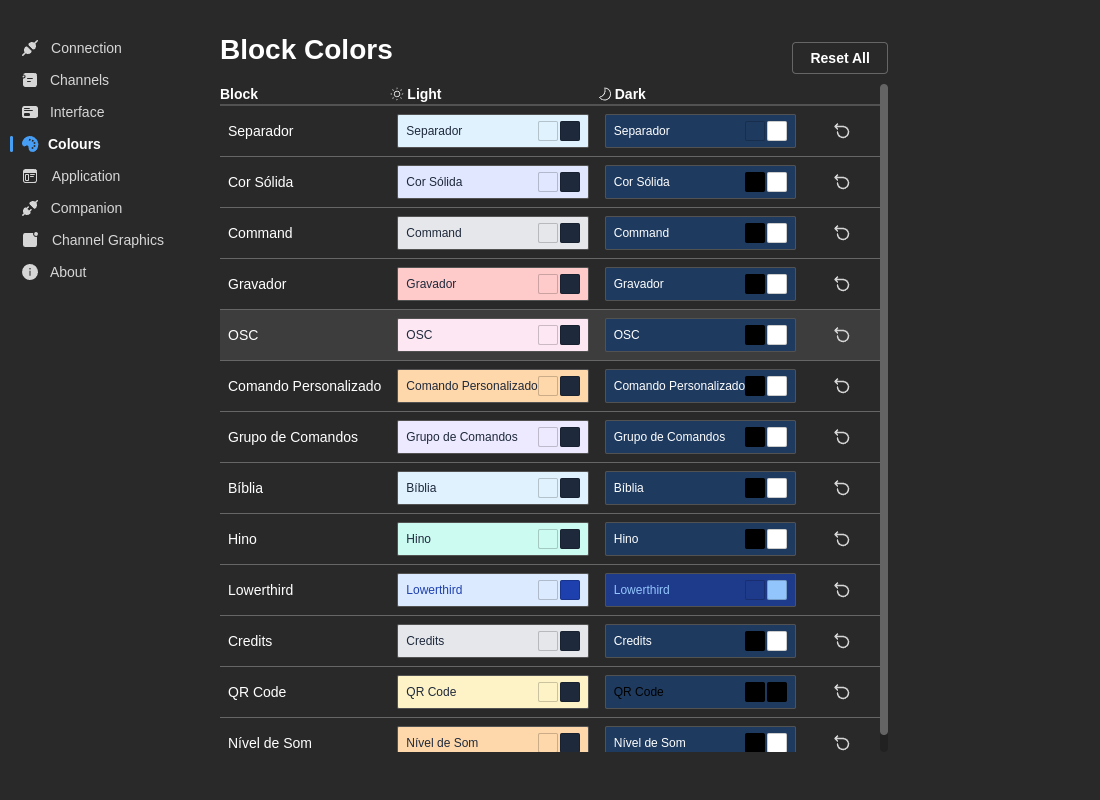
Color Customization
Each block type has four customizable color properties:
Light Theme Colors:
- Background Color - Block background in light theme
- Text Color - Block text in light theme
Dark Theme Colors:
- Background Color - Block background in dark theme
- Text Color - Block text in dark theme
Customizable Block Types
You can customize colors for all available block types:
- Command Group
- Command
- Media
- Lower Third
- Credits
- Bible
- Lyrics
- QR Code
- Credits
- Ticker
- Channel Graphics
- Emergency
Editing Colors
- Click on a color swatch to open the color picker
- Select your desired color using:
- Color selector
- Hex color input
- RGB values
- Changes save automatically
Actions:
- Reset (per block) - Reset individual block colors to defaults
- Reset All - Reset all block colors to defaults
:::tip Design Tip Use consistent color schemes across related block types. For example, all graphics blocks (lower thirds, credits) could use blue tones, while content blocks (Bible, lyrics) use purple tones. :::